Writing a Programmers Editor (Modes & Extensibility) - Part 11


Edited on: August 15, 2026
In Part 10 we built undo/redo. The editor can now hold text, display it, colour it, search
it, and forgive mistakes. And now we arrive at the question that started this whole series in
Part 1: how much power should the user have? This is the part where we make good on the
answer - 100%.
Extensibility Is Not A Feature, It Is A Shape
Here is the thing most editors get backwards. They build a fixed program and then bolt a "plugin API" onto the side - a narrow, second-class channel through which extensions may beg for capabilities the core deigns to expose. This is the borrowed power we criticised in Part 1: elisp can only do what the C runtime permits, vimscript only what vim's core allows.
Our editor is written in Scheme. The user extends it in Scheme. There is no boundary to cross, no reduced API, no borrowed power. Every function the editor uses to edit is a function the user can call, redefine, or wrap. Extensibility is not something we add; it is a consequence of the language being the same on both sides. The rest of this part is just giving that power convenient shape: modes and hooks.
Major Modes: Behaviour Per Language
A major mode is the editor's personality for a particular kind of file. Scheme mode knows about parentheses and the Scheme tokenizer from Part 9. Markdown mode knows about headings. C mode knows about braces and semicolons. Exactly one major mode is active in a buffer at a time, and it decides three things: the keymap, the tokenizer, and the indentation rule.
;;; A major mode bundles the per-language behaviour.
;;;   #(name keymap tokenizer indenter)

(define (make-major-mode name keymap tokenizer indenter)
  (vector name keymap tokenizer indenter))
(define (mode-name m)      (vector-ref m 0))
(define (mode-keymap m)    (vector-ref m 1))
(define (mode-tokenizer m) (vector-ref m 2))
(define (mode-indenter m)  (vector-ref m 3))

(define scheme-mode
  (make-major-mode 'scheme scheme-map tokenize-scheme scheme-indent))

(define fundamental-mode
  (make-major-mode 'fundamental global-map (lambda (s) '()) no-indent))
The editor picks a major mode when it opens a file, usually by extension. This is just a table lookup - and, being data, the user can extend it:
(define auto-mode-alist
  (list (cons ".scm" scheme-mode)
        (cons ".ss"  scheme-mode)
        (cons ".md"  markdown-mode)))

;; Choose a major mode from a filename, defaulting to fundamental.
(define (mode-for-file path)
  (let ((cell (assoc (file-extension path) auto-mode-alist)))
    (if cell (cdr cell) fundamental-mode)))

(define (set-major-mode! eb mode)
  (eb-set-mode! eb mode)
  (eb-set-tokenizer! eb (mode-tokenizer mode))
  (run-hooks eb (mode-hook-name mode)))          ; more on hooks below
Minor Modes: Composable, Optional, Many
Where exactly one major mode is active, any number of minor modes can be layered on top. Line numbers, auto-indent, a spell-checker, a live-error overlay - each is an independent, toggleable feature. The design challenge is composition: several minor modes may all want to bind keys or react to edits, without stepping on each other or on the major mode.
We already have the tool for the keymap half of this problem - the keymap tree from Part 6. Minor-mode keymaps stack in a priority list, searched before the major mode's map:
;;; A minor mode: a name, an optional keymap, and enable/disable thunks.
(define (make-minor-mode name keymap on off) (vector name keymap on off))
(define (minor-name m)   (vector-ref m 0))
(define (minor-keymap m) (vector-ref m 1))
(define (minor-on m)     (vector-ref m 2))
(define (minor-off m)    (vector-ref m 3))

;; Look a key up across active minor maps first, then the major map.
(define (resolve-key eb k)
  (let loop ((maps (append (map minor-keymap (eb-active-minors eb))
                           (list (mode-keymap (eb-mode eb))))))
    (cond
     ((null? maps) #f)
     ((keymap-ref (car maps) k) => (lambda (b) b))
     (else (loop (cdr maps))))))
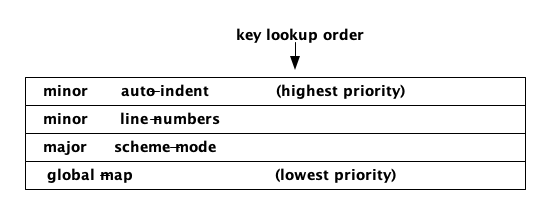
Figure 1: Keymap resolution order - active minor modes are consulted first, then the major mode, then the global map.
Hooks: Extension Points In Time
Modes shape behaviour by file type. Hooks let the user shape behaviour by event. A hook is simply a named list of functions that the editor promises to call at a well-defined moment: before a save, after a command, when a mode turns on. Because functions are first-class in Scheme, a hook is just a list you can push onto.
;;; Hooks live in a global table: name -> list of thunks.
(define hook-table (make-hash-table))

;; Add a function to a hook (users call this in their config).
(define (add-hook! name proc)
  (hash-table-update!/default hook-table name
                              (lambda (fns) (cons proc fns)) '()))

;; Run every function registered on a hook, most-recently-added last.
(define (run-hooks eb name)
  (for-each (lambda (f) (f eb))
            (reverse (hash-table-ref/default hook-table name '()))))
Now the editor sprinkles run-hooks at its key moments, and the user gets to run code there
without touching the core:
;; The save command, with a hook the user can extend.
(define (cmd-save-file eb)
  (run-hooks eb 'before-save-hook)               ; e.g. strip trailing whitespace
  (write-buffer-to-file eb)
  (run-hooks eb 'after-save-hook))               ; e.g. run a linter

;; A user's configuration - pure Scheme, no special API.
(add-hook! 'before-save-hook
           (lambda (eb) (strip-trailing-whitespace! eb)))

(add-hook! 'scheme-mode-hook
           (lambda (eb) (enable-minor-mode! eb auto-indent-mode)))
That second example is the whole system in miniature: "whenever a file enters Scheme mode, turn on auto-indent." The user wrote a behaviour rule, in the editor's own language, wiring together a mode and a minor mode the core author never anticipated pairing.
The Scripting Surface - Delivering On 100%
This is the promise from Part 1, made concrete. Because the editor is Scheme and the config is
Scheme, the user's init.scm is not a limited settings file - it is a program with the full
run of the editor's internals. There is no capability the core has that the user lacks.
;; ~/.editor/init.scm - a real program, not a config format.

;; Define a brand-new command in terms of existing primitives.
(define (cmd-duplicate-line eb)
  (let* ((line  (eb-current-line-text eb))
         (end   (eb-line-end eb (eb-current-line eb))))
    (buffer-insert-at! eb end (string-append "\n" line))))

;; Bind it - using the exact keymap machinery the core uses.
(define-key! global-map (list (key '(ctrl) #\c) (key '(ctrl) #\d))
  cmd-duplicate-line)

;; Redefine an existing command by wrapping it - advice, for free.
(let ((original cmd-save-file))
  (set! cmd-save-file
        (lambda (eb) (message eb "Saving...") (original eb))))
Read that last block again. The user redefined a core command from their config, wrapping it
with new behaviour, using nothing but set! and a closure. No plugin manifest, no permission
system, no FFI. This is what "no power gap" actually means, and it is impossible in an editor
where the core is C and the extension language merely visits.
The Cost Of Total Power
Honesty demands the flip side. Total power is total responsibility. A user who can redefine
cmd-save-file can also break it. An extension that hangs in a hook hangs the editor. Emacs
lives with exactly this - a bad after-save-hook can wedge your session - and it is the price
of the model. The C-runtime editors trade some of the user's power for the safety of a
sandbox. Our editor, like emacs at its most extreme, hands the user the keys to everything and
trusts them. Whether that is the right trade is the very question we set out to explore, and it
is where Part 12 goes.
What We Have Now
The editor is extensible to its core:
- Major modes select per-language keymap, tokenizer, and indentation.
- Minor modes layer optional, composable features with priority-ordered keymaps.
- Hooks expose named moments in time for user code to run.
- The scripting surface is the editor's own internals - the
100%power promise, delivered.
The editor is complete. It is a working text editor written entirely in Scheme, extended in Scheme, with no runtime power gap. All that is left is to look back and ask whether it was worth it - and whether the answers we found match the questions we started with.
In the final part we reflect on the whole journey and return, at last, to the questions from Part 1.
Watchout for the next part of the assay, till then.
Shorel'aran
Writing a Programmer's Editor
A series of assays on building a programmable text editor from scratch in Scheme - exploring the balance of power between the C runtime and the scripting language, data structures, terminal I/O, and extensibility.
- 1 Writing a Programmers Editor - Part 1 2018-08-06
- 2 Writing a Programmers Editor (DS/Gapbuffer) - Part 2 2018-08-11
- 3 Writing a Programmers Editor (Gap Buffer in Scheme) - Part 3 2018-08-18
- 4 Writing a Programmers Editor (Lines & Display) - Part 4 2018-08-25
- 5 Writing a Programmers Editor (Terminal I/O & Raw Mode) - Part 5 2018-09-01
- 6 Writing a Programmers Editor (Keymaps & Input Handling) - Part 6 2018-09-08
- 7 Writing a Programmers Editor (Rendering & Redisplay) - Part 7 2018-09-15
- 8 Writing a Programmers Editor (Search & Replace) - Part 8 2018-09-22
- 9 Writing a Programmers Editor (Syntax Highlighting) - Part 9 2018-09-29
- 10 Writing a Programmers Editor (Undo/Redo & Command Log) - Part 10 2018-10-06
- 11 Writing a Programmers Editor (Modes & Extensibility) - Part 11 Here 2018-10-13
- 12 Writing a Programmers Editor (Reflections & Lessons) - Part 12 2018-10-20
Responses