Writing a Programmers Editor (Undo/Redo & Command Log) - Part 10


Edited on: August 15, 2026
In Part 9 we gave the editor colour. The editor now looks and feels real. But one thing is still missing, and it is the thing that lets people trust an editor: the ability to take back a mistake. Undo is the safety net. Get it wrong and users edit timidly, afraid of losing work. Get it right and they experiment freely, knowing they can always step back.
The Command Pattern: Every Edit Is Reversible
The foundational idea is to stop thinking of edits as things that happen and start thinking of them as objects. Each edit is a small record that knows two things: how to do itself and how to undo itself. This is the classic command pattern, and it is the bedrock of every undo system.
For a text editor, the two primitive edits are insertion and deletion - and they are perfect
inverses. The undo of "insert X at position 5" is "delete the text at position 5". The undo
of "delete Y at position 5" is "insert Y back at position 5". So an edit record needs
only: the kind, the position, and the text involved.
;;; An edit record: #(kind pos text)
;;;   kind - 'insert or 'delete
;;;   pos  - buffer offset where it happened
;;;   text - the string inserted or deleted

(define (edit kind pos text) (vector kind pos text))
(define (edit-kind e) (vector-ref e 0))
(define (edit-pos  e) (vector-ref e 1))
(define (edit-text e) (vector-ref e 2))

;; The inverse of an edit - insert becomes delete and vice versa.
(define (invert-edit e)
  (edit (if (eq? (edit-kind e) 'insert) 'delete 'insert)
        (edit-pos e)
        (edit-text e)))

;; Apply an edit to the buffer (used for both do and redo/undo).
(define (apply-edit! eb e)
  (case (edit-kind e)
    ((insert) (buffer-insert-at! eb (edit-pos e) (edit-text e)))
    ((delete) (buffer-delete-at! eb (edit-pos e) (string-length (edit-text e))))))
With inversion in hand, undo is almost trivial: to undo an edit, apply its inverse.
Linear Undo: Two Stacks
The simplest complete undo system is two stacks. When the user makes an edit, push it on the undo stack. To undo, pop the undo stack, apply the inverse, and push the original onto the redo stack. To redo, pop the redo stack, re-apply, and push back onto undo. Any new edit clears the redo stack - you cannot redo down a path you have abandoned.
;;; History: two stacks held in a mutable record.
(define (make-history) (vector '() '()))          ; (undo-stack redo-stack)
(define (hist-undo h)     (vector-ref h 0))
(define (hist-redo h)     (vector-ref h 1))
(define (hist-undo! h v)  (vector-set! h 0 v))
(define (hist-redo! h v)  (vector-set! h 1 v))

;; Record a freshly-performed edit. New edits invalidate the redo branch.
(define (history-record! h e)
  (hist-undo! h (cons e (hist-undo h)))
  (hist-redo! h '()))

;; Undo: pop the undo stack, apply the inverse, remember it for redo.
(define (do-undo! eb h)
  (let ((stack (hist-undo h)))
    (unless (null? stack)
      (let ((e (car stack)))
        (apply-edit! eb (invert-edit e))
        (hist-undo! h (cdr stack))
        (hist-redo! h (cons e (hist-redo h)))))))

;; Redo: pop the redo stack, re-apply, push back onto undo.
(define (do-redo! eb h)
  (let ((stack (hist-redo h)))
    (unless (null? stack)
      (let ((e (car stack)))
        (apply-edit! eb e)
        (hist-redo! h (cdr stack))
        (hist-undo! h (cons e (hist-undo h)))))))
That is a fully working undo/redo in about thirty lines. But used naively it has an annoying flaw: it undoes one character at a time.
Grouping: One Word, One Undo
If typing "hello" pushes five separate insert records, then undo removes "o", then "l", then "l"... users hate this. They expect undo to work in meaningful units - a word, a line, a command. The solution is to coalesce consecutive similar edits into a group.
The rule emacs uses is essentially: consecutive self-inserts merge, but a cursor movement, a deletion, or a pause breaks the group. We implement this by checking whether a new edit is adjacent and same-kind as the top of the undo stack, and if so, extending it instead of pushing:
;; Record an insert, coalescing with the previous one if adjacent.
(define (history-record-insert! h pos text)
  (let ((stack (hist-undo h)))
    (if (and (pair? stack)
             (eq? (edit-kind (car stack)) 'insert)
             ;; New text begins exactly where the previous insert ended.
             (= pos (+ (edit-pos (car stack))
                       (string-length (edit-text (car stack))))))
        ;; Extend the existing group in place.
        (hist-undo! h (cons (edit 'insert (edit-pos (car stack))
                                  (string-append (edit-text (car stack)) text))
                            (cdr stack)))
        ;; Start a new group.
        (history-record! h (edit 'insert pos text)))
    (hist-redo! h '())))
Now typing a word is a single undo, but moving the cursor and typing again starts a fresh group - exactly the behaviour muscle memory expects. The same coalescing logic, mirrored, handles runs of backspaces.
Beyond Linear: The Undo Tree
Linear undo has a subtle data-loss problem. Suppose you type A, undo it, then type B. In a two-stack model, typing B clears the redo stack - A is gone forever. But what if you wanted it back? Vim's answer is the undo tree: history is not a line, it is a branching tree, and no state is ever destroyed.
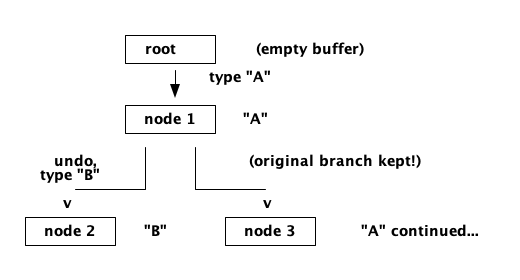
Figure 1: An undo tree - undoing then editing creates a new branch instead of discarding the old one. Every past state remains reachable.
A tree node holds an edit, a link to its parent, and a list of children. "Undo" walks to the parent; "redo" walks to the most recent child; and a tree-navigation command lets you pick a different child to travel down an abandoned branch.
;;; An undo-tree node: #(edit parent children)
(define (node edit parent) (vector edit parent '()))
(define (node-edit n)       (vector-ref n 0))
(define (node-parent n)     (vector-ref n 1))
(define (node-children n)   (vector-ref n 2))
(define (node-add-child! n c) (vector-set! n 2 (cons c (node-children n))))

;; Record an edit as a new child of the current node, and move there.
(define (tree-record! tree e)
  (let* ((cur   (tree-current tree))
         (child (node e cur)))
    (node-add-child! cur child)
    (tree-set-current! tree child)))

;; Undo: apply the current node's inverse and step up to its parent.
(define (tree-undo! eb tree)
  (let ((cur (tree-current tree)))
    (when (node-parent cur)
      (apply-edit! eb (invert-edit (node-edit cur)))
      (tree-set-current! tree (node-parent cur)))))

;; Redo: step down to the most recently created child and re-apply.
(define (tree-redo! eb tree)
  (let ((cur (tree-current tree)))
    (unless (null? (node-children cur))
      (let ((child (car (node-children cur))))   ; newest child
        (apply-edit! eb (node-edit child))
        (tree-set-current! tree child)))))
The tree never throws anything away. That is its whole virtue - and, arguably, its whole cost, since the history can grow without bound. Emacs, interestingly, takes a third path entirely: it has no separate redo. In emacs, undo is itself an undoable command, so "undoing an undo" redoes - which, followed far enough, also lets you reach abandoned states, at the price of a notoriously confusing mental model.
The Command Log - A Bigger Idea
Step back and notice what we have really built. An undo stack is a log of edits. But if we are already recording every edit as a reversible, replayable object, that log is worth far more than undo alone:
- Crash recovery: replay the log against the last saved file to reconstruct unsaved work.
- Macros: a keyboard macro is just a slice of the command log, replayed on demand.
- Collaboration: stream edit records to another editor and apply them there - the seed of real-time collaborative editing (this is essentially what operational transforms do).
- Audit: the log is the complete history of how a document came to be.
This is the deep payoff of the command pattern. By making every edit a first-class, invertible value, undo stops being a special feature and becomes one reading of a general structure. It is the same lesson the incremental-search stack taught us in Part 8: record the history of an interaction, and capabilities fall out for free.
What We Have Now
The editor forgives:
- Every edit is a reversible command object with a clean inverse.
- Linear two-stack undo/redo, with coalescing so words undo as units.
- An undo tree that never discards a past state.
- A command log that generalises to macros, recovery, and collaboration.
The editor can now hold, display, colour, search, and undo text. It is a real editor. What remains is the promise that started the whole series in Part 1: giving the user the power to reshape it.
In the next part we build the extensibility layer - modes, hooks, and the scripting surface
that delivers on the 100% power promise.
Watchout for the next part of the assay, till then.
Shorel'aran
Writing a Programmer's Editor
A series of assays on building a programmable text editor from scratch in Scheme - exploring the balance of power between the C runtime and the scripting language, data structures, terminal I/O, and extensibility.
- 1 Writing a Programmers Editor - Part 1 2018-08-06
- 2 Writing a Programmers Editor (DS/Gapbuffer) - Part 2 2018-08-11
- 3 Writing a Programmers Editor (Gap Buffer in Scheme) - Part 3 2018-08-18
- 4 Writing a Programmers Editor (Lines & Display) - Part 4 2018-08-25
- 5 Writing a Programmers Editor (Terminal I/O & Raw Mode) - Part 5 2018-09-01
- 6 Writing a Programmers Editor (Keymaps & Input Handling) - Part 6 2018-09-08
- 7 Writing a Programmers Editor (Rendering & Redisplay) - Part 7 2018-09-15
- 8 Writing a Programmers Editor (Search & Replace) - Part 8 2018-09-22
- 9 Writing a Programmers Editor (Syntax Highlighting) - Part 9 2018-09-29
- 10 Writing a Programmers Editor (Undo/Redo & Command Log) - Part 10 Here 2018-10-06
- 11 Writing a Programmers Editor (Modes & Extensibility) - Part 11 2018-10-13
- 12 Writing a Programmers Editor (Reflections & Lessons) - Part 12 2018-10-20
Responses