Writing a Programmers Editor (Keymaps & Input Handling) - Part 6


Edited on: August 15, 2026
In Part 5 we taught the editor to read raw keystrokes from the terminal. But a keystroke
is just a byte, or a short sequence of bytes. \e[A means "up arrow" only because we
decide it does. The mapping from bytes to actions is the keymap, and it is one of the
most consequential design decisions in any editor.
Here is a claim I will defend for the rest of this article: the keymap is where an editor's personality lives. Emacs and vim both read the same bytes from the same terminal driver we built in Part 5. What makes them feel like different universes is not the buffer, not the renderer - it is how they interpret those bytes.
From Bytes To Key Events
The raw read-key from Part 5 gave us either a character or a symbol like 'up. But real
editors bind modified keys - Ctrl-x, Meta-f, Ctrl-Meta-s. We need to fold those
modifiers into a single, comparable representation.
In a terminal, control keys are not special escape sequences - they are genuinely different
bytes. Ctrl-A is byte 1, Ctrl-B is byte 2, all the way to Ctrl-Z at byte 26. In
general, Ctrl with a letter clears the top three bits of its ASCII code. The Meta (Alt)
modifier is even simpler: the terminal prefixes the key with an escape byte. Meta-f is
\e f.
We normalise all of this into a small tagged value - a key event:
;;; A key event is a pair: (modifiers . base)
;;;   modifiers - a list drawn from '(ctrl meta)
;;;   base      - a character, or a symbol like 'up / 'return / 'tab

(define (key mods base) (cons mods base))
(define (key-mods k)    (car k))
(define (key-base k)    (cdr k))

;; Convert a raw control byte back into (ctrl . letter).
(define (decode-control ch)
  (let ((code (char->integer ch)))
    (if (and (>= code 1) (<= code 26))
        (key '(ctrl) (integer->char (+ code 96)))  ; 1 -> #\a
        (key '() ch))))
Now Ctrl-A and the letter a are distinct, comparable values: ((ctrl) . #\a) versus
(() . #\a). That distinction is the whole game.
Parsing The Escape Layer
We extend Part 5's reader so that an escape byte can mean one of three things: a Meta
modifier on the next key, the start of an arrow-key sequence, or a bare Escape. Order of
checks matters - after \e we peek at the next byte to disambiguate.
;; Read one fully-decoded key event from the terminal.
(define (read-key-event)
  (let ((c (read-char)))
    (cond
     ((eof-object? c) 'eof)
     ((char=? c #\escape)
      (let ((next (read-char)))
        (cond
         ((eof-object? next) (key '() 'escape))
         ;; CSI sequence: arrows, home, end.
         ((char=? next #\[)
          (case (read-char)
            ((#\A) (key '() 'up))
            ((#\B) (key '() 'down))
            ((#\C) (key '() 'right))
            ((#\D) (key '() 'left))
            ((#\H) (key '() 'home))
            ((#\F) (key '() 'end))
            (else  (key '() 'escape))))
         ;; Otherwise it was Meta + the next key.
         (else (key '(meta) next)))))
     ((char=? c #\return)    (key '() 'return))
     ((char=? c #\tab)       (key '() 'tab))
     ((char=? c #\delete)    (key '() 'backspace))
     (else (decode-control c)))))
The Keymap Itself
What structure should hold the bindings? The naive answer is a flat hash table mapping key
events to commands. That works for single keys. But real editors use prefix keys: in
emacs, C-x C-f means "the C-f that follows C-x", which is completely different from a
bare C-f. A flat table cannot express this.
The right structure is a tree. Each keymap is a table of bindings; a binding is either a command (a leaf) or another keymap (a branch). Pressing a prefix key walks you one level down the tree.
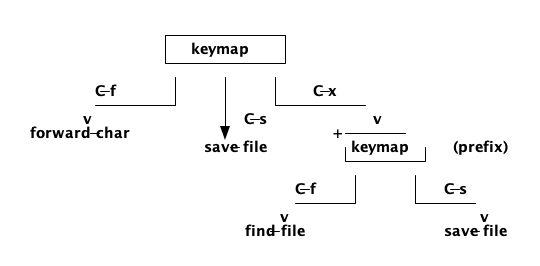
Figure 1: A keymap tree - most keys map to commands, but a prefix key like C-x maps to a nested keymap.
We represent a keymap as an association list keyed by key events. It is a table; some of its values are commands, some are child keymaps.
;;; A keymap is a mutable box holding an alist of (key-event . binding).
;;; A binding is either a procedure (command) or another keymap.

(define (make-keymap) (list 'keymap))
(define (keymap? x)    (and (pair? x) (eq? (car x) 'keymap)))

;; Bind a single key event in a keymap to a command or child keymap.
(define (keymap-set! km k binding)
  (let ((cell (assoc k (cdr km))))
    (if cell
        (set-cdr! cell binding)
        (set-cdr! km (cons (cons k binding) (cdr km))))))

;; Look up a single key event. Returns the binding or #f.
(define (keymap-ref km k)
  (let ((cell (assoc k (cdr km))))
    (and cell (cdr cell))))
Defining a multi-key binding is then just walking (or building) the tree:
;; Bind a sequence of key events to a command, creating prefix maps as needed.
(define (define-key! km keys command)
  (if (null? (cdr keys))
      (keymap-set! km (car keys) command)
      (let ((next (keymap-ref km (car keys))))
        (let ((child (if (keymap? next) next (make-keymap))))
          (keymap-set! km (car keys) child)
          (define-key! child (cdr keys) command)))))
The Dispatcher
The dispatcher is the heart of the input loop. It reads a key, looks it up, and reacts:
- If the binding is a command, run it.
- If the binding is a keymap, we are mid-prefix - read the next key and descend.
- If there is no binding, either self-insert (a plain printable character) or beep.
;; Read keys and dispatch against a keymap until a command runs.
(define (dispatch editor root-map)
  (let loop ((km root-map))
    (let* ((k       (read-key-event))
           (binding (keymap-ref km k)))
      (cond
       ((procedure? binding) (binding editor))      ; run the command
       ((keymap? binding)    (loop binding))        ; prefix - read more
       ;; Unbound plain character in the top-level map: insert it.
       ((and (eq? km root-map) (self-insertable? k))
        (self-insert-command editor (key-base k)))
       (else (beep))))))                            ; unknown chord

(define (self-insertable? k)
  (and (null? (key-mods k)) (char? (key-base k))))
Now building the default bindings is declarative and readable - this is where the editor's character is written down:
(define global-map (make-keymap))

;; Movement.
(define-key! global-map (list (key '(ctrl) #\f)) cmd-forward-char)
(define-key! global-map (list (key '(ctrl) #\b)) cmd-backward-char)
(define-key! global-map (list (key '(ctrl) #\n)) cmd-next-line)
(define-key! global-map (list (key '(ctrl) #\p)) cmd-previous-line)
(define-key! global-map (list (key '() 'up))     cmd-previous-line)
(define-key! global-map (list (key '() 'down))   cmd-next-line)

;; A prefix chord: C-x C-s to save, C-x C-c to quit.
(define-key! global-map
  (list (key '(ctrl) #\x) (key '(ctrl) #\s)) cmd-save-file)
(define-key! global-map
  (list (key '(ctrl) #\x) (key '(ctrl) #\c)) cmd-quit)
Two Philosophies: Modal And Modeless
We now have the machinery for modeless editing - the emacs way, where every key does the same thing all the time and modifiers select commands. But there is another school entirely: modal editing, the vim way.
In a modal editor the same key means different things depending on the current mode. In
insert mode, j inserts the letter j. In normal mode, j moves the cursor down. There are
no modifiers on the common commands because the mode is the modifier.
Beautifully, our tree-of-keymaps structure handles both with no new machinery. Modal editing is just swapping which keymap is active:
;; Modal editing: the active keymap depends on the editor's current mode.
(define normal-map (make-keymap))
(define insert-map (make-keymap))

(define-key! normal-map (list (key '() #\j)) cmd-next-line)
(define-key! normal-map (list (key '() #\k)) cmd-previous-line)
(define-key! normal-map (list (key '() #\i))
  (lambda (ed) (editor-set-mode! ed 'insert)))

;; In insert mode, unbound printable keys self-insert; Esc goes back.
(define-key! insert-map (list (key '() 'escape))
  (lambda (ed) (editor-set-mode! ed 'normal)))

;; The dispatcher just picks the keymap for the current mode.
(define (active-keymap ed)
  (case (editor-mode ed)
    ((normal) normal-map)
    ((insert) insert-map)
    (else     global-map)))
This is the payoff of building the right abstraction. We did not design a "modal system" and a "modeless system" separately. We built one thing - a tree of keymaps and a dispatcher - and both philosophies fall out of how we wire it up. The user who wants emacs bindings and the user who wants vim bindings are both first-class citizens, because the keymap is data, not hard-coded logic.
What We Have Now
Input handling is complete:
- Raw bytes are decoded into normalised key events with modifiers.
- Bindings live in a keymap tree that naturally supports prefix chords.
- A single dispatcher drives the whole input loop.
- Both modeless (emacs-style) and modal (vim-style) editing emerge from the same structure.
The editor can now read text, hold it, display it, and respond to commands. But every time the user presses a key, we still redraw the entire screen - and on a real terminal, over a real connection, that flickers and lags.
In the next part we tackle redisplay: how to repaint only the pixels that actually changed, the way a real editor keeps a screen feeling instant.
Watchout for the next part of the assay, till then.
Shorel'aran
Writing a Programmer's Editor
A series of assays on building a programmable text editor from scratch in Scheme - exploring the balance of power between the C runtime and the scripting language, data structures, terminal I/O, and extensibility.
- 1 Writing a Programmers Editor - Part 1 2018-08-06
- 2 Writing a Programmers Editor (DS/Gapbuffer) - Part 2 2018-08-11
- 3 Writing a Programmers Editor (Gap Buffer in Scheme) - Part 3 2018-08-18
- 4 Writing a Programmers Editor (Lines & Display) - Part 4 2018-08-25
- 5 Writing a Programmers Editor (Terminal I/O & Raw Mode) - Part 5 2018-09-01
- 6 Writing a Programmers Editor (Keymaps & Input Handling) - Part 6 Here 2018-09-08
- 7 Writing a Programmers Editor (Rendering & Redisplay) - Part 7 2018-09-15
- 8 Writing a Programmers Editor (Search & Replace) - Part 8 2018-09-22
- 9 Writing a Programmers Editor (Syntax Highlighting) - Part 9 2018-09-29
- 10 Writing a Programmers Editor (Undo/Redo & Command Log) - Part 10 2018-10-06
- 11 Writing a Programmers Editor (Modes & Extensibility) - Part 11 2018-10-13
- 12 Writing a Programmers Editor (Reflections & Lessons) - Part 12 2018-10-20
Responses