Writing a Programmers Editor (Rendering & Redisplay) - Part 7


Edited on: August 15, 2026
In Part 6 we wired keystrokes to commands. Now every command changes the buffer, and after every change the screen must reflect the new state. The obvious approach - clear the screen and redraw everything - is also the wrong one. It flickers, it wastes I/O, and on anything slower than a local terminal it feels sluggish.
This part is about redisplay: the art of changing as little of the screen as possible. A good redisplay engine is invisible. The screen simply feels responsive, and nobody wonders why. A bad one makes even a fast machine feel like it is chewing gum.
Why The Naive Repaint Fails
Consider what happens when the user types one character into a 50-line file on an 80×24 terminal. The naive loop does this:
- Send
\e[2J- erase the whole screen. - Redraw all 24 rows from the buffer.
- Reposition the cursor.
That is roughly 24 × 80 = 1920 characters pushed to the terminal to reflect one changed glyph. Worse, the erase-then-redraw creates a visible flash: for a brief moment the screen is blank, then it fills back in. Over SSH, over a serial line, over any latency at all, this is painful. Terminals are slow output devices by modern standards; the bottleneck is almost never computing the new screen, it is transmitting it.
The fix is a principle as old as computer graphics: do not draw what has not changed.
The Frame Buffer Model
The cleanest way to compute a minimal update is to keep two representations of the screen:
- The current frame - what is physically on the terminal right now.
- The pending frame - what we want the screen to look like.
We render the buffer into the pending frame in memory, then diff it against the current frame and emit terminal commands only for the cells that differ. Finally, the pending frame becomes the new current frame. This is double-buffering, and it is exactly how emacs' glyph matrices work under the hood.
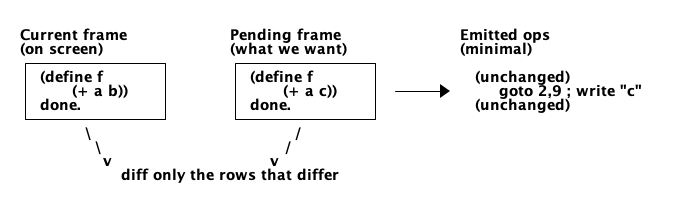
Figure 1: Differential redisplay - only the cells that differ between the current and pending frames are sent to the terminal.
A frame is just a vector of row strings:
;;; A frame holds the text of each screen row.
;;;   #(rows cols row-vector)

(define (make-frame rows cols)
  (vector rows cols
          (make-vector rows (make-string cols #\space))))

(define (frame-rows f)   (vector-ref f 0))
(define (frame-cols f)   (vector-ref f 1))
(define (frame-row f r)  (vector-ref (vector-ref f 2) r))
(define (frame-row! f r s) (vector-set! (vector-ref f 2) r s))
Rendering Into The Pending Frame
We reuse the viewport logic from Part 4, but instead of returning strings to nobody, we write them into the pending frame - padding each row to full width so the diff compares like for like:
;; Fill a frame with the visible portion of the editor buffer.
(define (render-to-frame! eb frame top-line)
  (let* ((rows (frame-rows frame))
         (cols (frame-cols frame))
         (visible (eb-render-viewport eb top-line rows cols)))
    (let loop ((r 0) (lines visible))
      (when (< r rows)
        (let ((text (if (pair? lines) (car lines) "")))
          (frame-row! frame r (pad-to text cols))
          (loop (+ r 1) (if (pair? lines) (cdr lines) '())))))))

;; Pad or truncate a string to exactly `n` columns.
(define (pad-to s n)
  (let ((len (string-length s)))
    (cond ((= len n) s)
          ((> len n) (substring s 0 n))
          (else (string-append s (make-string (- n len) #\space))))))
The Diff
Now the core: compare the two frames row by row and emit terminal operations only where they differ. The simplest useful granularity is the line - if any cell in a row changed, redraw that whole row. This is dirty line tracking, and it captures the vast majority of the win for a fraction of the complexity of per-cell diffing.
;; Emit terminal ops to turn `current` into `pending`. Returns the new current.
(define (redisplay! current pending)
  (let ((rows (frame-rows pending)))
    (hide-cursor)
    (let loop ((r 0))
      (when (< r rows)
        (let ((old (frame-row current r))
              (new (frame-row pending r)))
          (unless (string=? old new)          ; the dirty-line test
            (cursor-to (+ r 1) 1)             ; terminals are 1-indexed
            (term-write "\x1b[K")             ; clear to end of line
            (term-write new)))
        (loop (+ r 1))))
    (show-cursor)
    pending))                                 ; pending is the new current
The string?= comparison is the dirty check. Rows that match are skipped entirely - no
cursor move, no bytes sent. For a single-character edit, exactly one row differs, so the
entire screen update collapses to: hide cursor, jump to the changed row, clear it, write it,
show cursor. A handful of bytes instead of two thousand.
Going Finer: Per-Cell Diffing
Redrawing an entire changed row is already a huge improvement, but we can do better when a long line changes near its end. Instead of rewriting the whole row, we find the first and last columns that differ and rewrite only that span:
;; Find [first, last] columns where two equal-length rows differ, or #f.
(define (row-diff-span old new)
  (let ((n (string-length old)))
    (let find-first ((i 0))
      (cond
       ((= i n) #f)                            ; identical
       ((char=? (string-ref old i) (string-ref new i)) (find-first (+ i 1)))
       (else
        (let find-last ((j (- n 1)))
          (if (char=? (string-ref old j) (string-ref new j))
              (find-last (- j 1))
              (cons i j))))))))                 ; span [i, j]
With the span in hand, the redisplay writes only the differing substring at the correct column. Typing at the end of a 200-character line then costs a cursor move plus a few bytes, regardless of how long the line is. This is the difference between an editor that feels instant and one that visibly repaints.
The Cursor Is Part Of The Frame
There is a subtle trap here. We hide the cursor during redisplay so the user never sees it skitter across the screen mid-update. But after the diff is applied we must place it at the logical editing position - the (row, col) of the buffer's point within the viewport, not wherever the last write happened to leave it.
;; Place the terminal cursor at the editor's point within the viewport.
(define (place-cursor eb top-line)
  (let* ((pt   (eb-point eb))                  ; buffer offset of point
         (pos  (eb-offset->position eb pt))    ; (line . column) from Part 4
         (line (car pos))
         (col  (cdr pos)))
    (cursor-to (+ (- line top-line) 1) (+ col 1))))
Forgetting this step produces the classic bug where the visible cursor lags one keystroke behind the text - a dead giveaway of a hand-rolled redisplay.
Scrolling Without Repainting
One more optimisation worth naming. When the user scrolls down by one line, 23 of the 24
visible rows are the same content, shifted up by one row. Naively our diff would mark every
row dirty. But terminals have a hardware scroll region - \e[r to set it, then a newline at
the bottom scrolls the whole region in one operation. Emacs uses this heavily; it turns a
full-screen scroll into a single terminal command plus one freshly drawn row. We will not
implement it here, but it is worth knowing the trick exists: the terminal can move pixels for
you far faster than you can retransmit them.
The Redisplay Loop
Tying it together, the main loop becomes a clean cycle: read a key, run its command, render into the pending frame, diff against current, place the cursor.
(define (editor-loop eb)
  (call-with-values get-window-size
    (lambda (rows cols)
      (let loop ((current (make-frame rows cols))
                 (top-line 0))
        (let ((pending (make-frame rows cols)))
          (render-to-frame! eb pending top-line)
          (let ((now (redisplay! current pending)))
            (place-cursor eb top-line)
            (let ((k (read-key-event)))
              (unless (quit-key? k)
                (dispatch eb (active-keymap eb))
                (loop now (recompute-top-line eb top-line rows))))))))))
What We Have Now
The screen is now efficient:
- Double-buffered frames separate "what is shown" from "what we want".
- Dirty-line tracking skips unchanged rows entirely.
- Per-cell span diffing shrinks updates to the exact columns that changed.
- The cursor is placed logically, after every update, from the buffer's point.
The editor holds text, responds to commands, and repaints instantly. It is, honestly, usable. What it lacks now are the features that make an editor a tool rather than a toy - and the first one every programmer reaches for is search.
In the next part we build incremental search: results that appear as you type, before you even finish the query.
Watchout for the next part of the assay, till then.
Shorel'aran
Writing a Programmer's Editor
A series of assays on building a programmable text editor from scratch in Scheme - exploring the balance of power between the C runtime and the scripting language, data structures, terminal I/O, and extensibility.
- 1 Writing a Programmers Editor - Part 1 2018-08-06
- 2 Writing a Programmers Editor (DS/Gapbuffer) - Part 2 2018-08-11
- 3 Writing a Programmers Editor (Gap Buffer in Scheme) - Part 3 2018-08-18
- 4 Writing a Programmers Editor (Lines & Display) - Part 4 2018-08-25
- 5 Writing a Programmers Editor (Terminal I/O & Raw Mode) - Part 5 2018-09-01
- 6 Writing a Programmers Editor (Keymaps & Input Handling) - Part 6 2018-09-08
- 7 Writing a Programmers Editor (Rendering & Redisplay) - Part 7 Here 2018-09-15
- 8 Writing a Programmers Editor (Search & Replace) - Part 8 2018-09-22
- 9 Writing a Programmers Editor (Syntax Highlighting) - Part 9 2018-09-29
- 10 Writing a Programmers Editor (Undo/Redo & Command Log) - Part 10 2018-10-06
- 11 Writing a Programmers Editor (Modes & Extensibility) - Part 11 2018-10-13
- 12 Writing a Programmers Editor (Reflections & Lessons) - Part 12 2018-10-20
Responses