Writing a Programmers Editor (Syntax Highlighting) - Part 9


Edited on: August 15, 2026
In Part 8 we made the buffer searchable. Now we make it readable. Syntax highlighting - colouring keywords, strings, comments, and numbers differently - is what turns a wall of monospace into something the eye parses at a glance. And there is a particular joy in what we are about to do: write a Scheme syntax highlighter, in Scheme, that colours its own source.
Two Stages: Tokenize, Then Fontify
Every highlighter, no matter how fancy, is two stages bolted together:
- Tokenization (lexical analysis): split raw text into tokens - this run of characters is a keyword, that one is a string, this is a comment, that is a number.
- Fontification: map each token type to a face - a colour, and maybe bold or italic.
The tokenizer knows the language. The fontifier knows the theme. Keeping them separate means one tokenizer can drive many colour schemes, and one theme can style many languages.
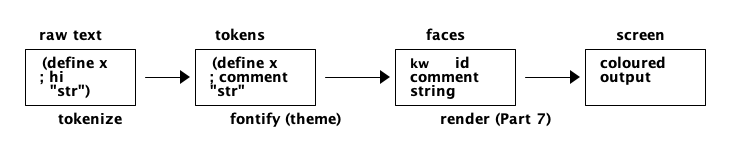
Figure 1: The highlighting pipeline - the tokenizer knows the language, the fontifier knows the theme.
A Tokenizer For Scheme
Scheme is a wonderful first language to tokenize because its lexical structure is tiny:
parentheses, strings, comments (; to end of line), quotes, and atoms (everything else -
symbols, numbers, keywords). We walk the text once, emitting a token for each lexeme. A token
records its type, and its start and end offsets in the buffer.
;;; A token: #(type start end)
(define (token type start end) (vector type start end))
(define (tok-type t)  (vector-ref t 0))
(define (tok-start t) (vector-ref t 1))
(define (tok-end t)   (vector-ref t 2))

(define (whitespace? c) (or (char=? c #\space) (char=? c #\tab) (char=? c #\newline)))
(define (delimiter? c)  (or (whitespace? c) (char=? c #\() (char=? c #\))
                            (char=? c #\") (char=? c #\;)))
The lexer itself is a let loop over the text that dispatches on the current character:
;; Tokenize a Scheme source string into a list of tokens.
(define (tokenize-scheme text)
  (let ((n (string-length text)))
    (let loop ((i 0) (acc '()))
      (if (>= i n)
          (reverse acc)
          (let ((c (string-ref text i)))
            (cond
             ;; Whitespace - skip, emit nothing.
             ((whitespace? c) (loop (+ i 1) acc))
             ;; Parentheses - single-character punctuation tokens.
             ((or (char=? c #\() (char=? c #\)))
              (loop (+ i 1) (cons (token 'paren i (+ i 1)) acc)))
             ;; Comment - from ; to end of line.
             ((char=? c #\;)
              (let ((end (scan-to text i #\newline)))
                (loop end (cons (token 'comment i end) acc))))
             ;; String - from " to the closing " (respecting escapes).
             ((char=? c #\")
              (let ((end (scan-string text (+ i 1))))
                (loop end (cons (token 'string i end) acc))))
             ;; Atom - a run up to the next delimiter.
             (else
              (let ((end (scan-atom text i)))
                (loop end (cons (token (classify-atom text i end) i end) acc))))))))))
The little scanners are unremarkable but necessary - each advances the index to the end of its lexeme:
;; Advance until `stop` char (or EOF); return the index past it.
(define (scan-to text i stop)
  (let ((n (string-length text)))
    (let loop ((j i))
      (cond ((>= j n) j)
            ((char=? (string-ref text j) stop) (+ j 1))
            (else (loop (+ j 1)))))))

;; Scan a string body, honouring backslash escapes; return index past closing ".
(define (scan-string text i)
  (let ((n (string-length text)))
    (let loop ((j i))
      (cond ((>= j n) j)
            ((char=? (string-ref text j) #\\) (loop (+ j 2)))   ; skip escape
            ((char=? (string-ref text j) #\") (+ j 1))
            (else (loop (+ j 1)))))))

;; Scan an atom up to the next delimiter.
(define (scan-atom text i)
  (let ((n (string-length text)))
    (let loop ((j i))
      (if (or (>= j n) (delimiter? (string-ref text j))) j (loop (+ j 1))))))
Classifying Atoms
An atom might be a number, a language keyword, or an ordinary identifier. The tokenizer asks one small classifier to decide, using a table of known keywords:
(define scheme-keywords
  '("define" "lambda" "let" "let*" "letrec" "if" "cond" "case" "when"
    "unless" "begin" "set!" "quote" "quasiquote" "and" "or" "do" "else"))

;; Decide whether the atom text[start,end) is a keyword, number, or identifier.
(define (classify-atom text start end)
  (let ((s (substring text start end)))
    (cond
     ((member s scheme-keywords) 'keyword)
     ((string->number s)         'number)
     (else                       'identifier))))
That is the entire Scheme lexer. Because the language is so regular, it fits in a page - and it is easy to extend a classifier for a chunkier language later.
Fontification: Tokens To Colours
Now the theme. A face table maps token types to terminal colour codes (the 256-colour palette from Part 5). Swapping themes is swapping this table - nothing else changes.
;;; A theme maps token types to 256-colour foreground codes.
(define solarized-dark
  '((keyword    . 33)     ; blue
    (string     . 37)     ; cyan
    (comment    . 245)    ; grey
    (number     . 61)     ; violet
    (identifier . 254)    ; near-white
    (paren      . 244)))  ; dim grey

(define (face-for theme type)
  (let ((cell (assq type theme)))
    (if cell (cdr cell) 254)))            ; default: plain text
To render a highlighted line we walk its tokens, emit a colour escape, write the token's text, and reset. The heavy lifting - where the text goes on screen - is still the redisplay engine from Part 7; highlighting only decides what colour each span is.
;; Produce a coloured string for the given text using a token list + theme.
(define (fontify text tokens theme)
  (let ((out (open-output-string)))
    (for-each
     (lambda (tk)
       (write-string (string-append "\x1b[38;5;"
                                    (number->string (face-for theme (tok-type tk)))
                                    "m") out)
       (write-string (substring text (tok-start tk) (tok-end tk)) out)
       (write-string "\x1b[0m" out))
     tokens)
    (get-output-string out)))
The Performance Problem: Do Not Re-Tokenize The World
Here is the trap. If we re-tokenize the entire buffer on every keystroke, a large file will crawl. Tokenizing a 10,000-line file to recolour one edited line is madness - and it is exactly the mistake that makes hand-rolled highlighters feel slow.
The fix is incremental fontification: only re-tokenize the region that changed. For most languages, a single edit affects only the current line, so we re-tokenize that line and move on. This dovetails perfectly with the dirty-line tracking from Part 7 - the same rows we redraw are the only rows we re-highlight.
;; Re-tokenize just the line containing `offset` after an edit.
(define (rehighlight-line! eb offset)
  (let* ((line   (eb-offset->line eb offset))
         (start  (eb-line-start eb line))
         (end    (eb-line-end eb line))
         (text   (buffer-substring eb start end)))
    (eb-set-line-tokens! eb line (tokenize-scheme text))
    (mark-line-dirty! eb line)))                ; Part 7 will redraw it
There is one wrinkle: some tokens span lines - a multi-line string, or a block comment. Editing inside one can change the highlighting of lines below it. Emacs solves this by tracking the lexer's state at the end of each line (are we "inside a string"?) and re-tokenizing downward only until the state stabilises. For a Scheme editor, whose strings and comments rarely straddle lines, single-line re-tokenizing is a fine first approximation, with a "re-tokenize to end of buffer" escape hatch for the rare multi-line case.
How The Big Editors Do It
Two designs are worth naming, because ours sits between them:
- Emacs
font-lockdrives highlighting from regular expressions plus code hooks, with priority levels so that, say, a keyword inside a comment stays comment-coloured. It is pragmatic and per-mode. - TextMate / VS Code grammars use scoped, nested rules - a stack of grammar contexts that can push and pop, giving precise nested highlighting (a regex inside a string inside a template literal). More powerful, considerably heavier.
Our tokenizer-plus-theme design is the honest middle: a real lexer (not just regexes), a swappable theme, and incremental updates. It is enough to make Scheme code sing, and the architecture generalises.
What We Have Now
The editor now shows coloured code:
- A single-pass Scheme tokenizer that classifies keywords, strings, comments, numbers.
- A theme layer that maps token types to colours, swappable at will.
- Incremental re-highlighting keyed to the same dirty lines the renderer already tracks.
- A clear path to richer languages and multi-line token state.
The editor is now genuinely pleasant to use. But it still cannot forgive a mistake - there is no undo. That is the safety net every editor needs, and it is more subtle than it looks.
In the next part we build undo and redo - from a simple linear stack all the way to vim's branching undo tree.
Watchout for the next part of the assay, till then.
Shorel'aran
Writing a Programmer's Editor
A series of assays on building a programmable text editor from scratch in Scheme - exploring the balance of power between the C runtime and the scripting language, data structures, terminal I/O, and extensibility.
- 1 Writing a Programmers Editor - Part 1 2018-08-06
- 2 Writing a Programmers Editor (DS/Gapbuffer) - Part 2 2018-08-11
- 3 Writing a Programmers Editor (Gap Buffer in Scheme) - Part 3 2018-08-18
- 4 Writing a Programmers Editor (Lines & Display) - Part 4 2018-08-25
- 5 Writing a Programmers Editor (Terminal I/O & Raw Mode) - Part 5 2018-09-01
- 6 Writing a Programmers Editor (Keymaps & Input Handling) - Part 6 2018-09-08
- 7 Writing a Programmers Editor (Rendering & Redisplay) - Part 7 2018-09-15
- 8 Writing a Programmers Editor (Search & Replace) - Part 8 2018-09-22
- 9 Writing a Programmers Editor (Syntax Highlighting) - Part 9 Here 2018-09-29
- 10 Writing a Programmers Editor (Undo/Redo & Command Log) - Part 10 2018-10-06
- 11 Writing a Programmers Editor (Modes & Extensibility) - Part 11 2018-10-13
- 12 Writing a Programmers Editor (Reflections & Lessons) - Part 12 2018-10-20
Responses